AMOUNT DUEA$164.00Create sale
The sale stays in familiar AUD, even when an enabled customer payment route uses something else underneath.
 by Am I Recommended?
Create the sale → show Scan + Tap → confirm payment → update the business record.
AIR Checkout brings the sale, customer payment screen, receipts and stock together. Show a QR for eligible digital payments on the customer's phone, with Tap to Pay on the same display for approved NFC staff devices. Cash is taken and recorded by staff. Digital routes and NFC collection require provider onboarding.
No crypto knowledge required. AIR keeps the staff workflow simple: show the QR for an enabled digital payment or record cash taken in person.
The sale stays in familiar AUD, even when an enabled customer payment route uses something else underneath.
Customers scan the QR with their phone or tap a contactless card on an eligible staff NFC device. Both options are pictured on one checkout screen.
Bank, card and crypto options appear only when activated for the merchant. Cash is received and recorded by staff, not paid through the QR.
From a branded customer screen to payment records, receipts and stock—see how a complete sale fits together.
Staff add products or a custom AUD amount. The sale, payment and stock all share one record.
Display QR and contactless together. Scan on the customer phone, or tap a card on an eligible staff NFC device.
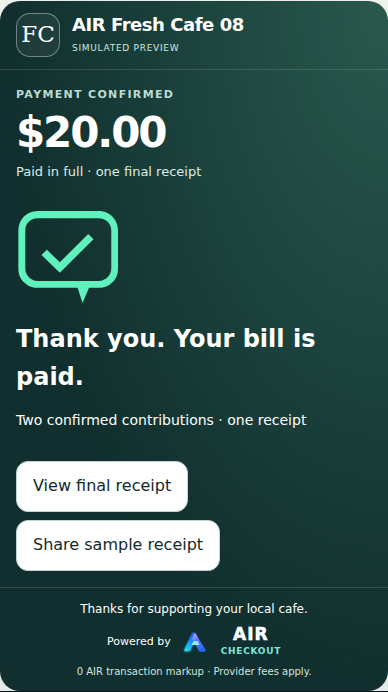
Track provider-confirmed payments against the bill—not merely an attempted or pending payment.
Keep an itemised receipt and share the record with the customer.
Previous bill and receipt saved in the business record.
For split bills, show what remains; otherwise create the next sale without losing the previous record.
One screen, two ways to pay. The QR opens an enabled digital checkout on the customer's own phone. Contactless card or wallet tap uses NFC on an eligible staff device and an approved provider. They are shown together, but a QR code does not itself read cards. Cash is taken and recorded by staff.
Take part payments, manage itemised service jobs, customise the customer screen and keep your business in view.
Keep confirmed contributions, outstanding amounts and receipts together on the same sale.
Scan + Tap preview · split-payment rollout exampleItemise labour and parts, show deposits and remaining balances, and make collection straightforward.
Mechanic checkout · illustrativeTry your name and colours above, then customise your logo, background, font and customer message in the full editor. Open the free designer →
Private style preview · merchant activation subject to rolloutConnect sales with products, stock, staff permissions, receipts and daily reporting.
Illustrative owner view · demo figuresThe checkout and tracked inventory use the same recorded sale. These example quantities illustrate stock changes only after a confirmed or correctly recorded sale—not when a customer simply opens the payment screen.
Illustrative screens and fictional demo data, not actual customer transactions. Stock changes depend on a correctly configured catalogue and a completed sale. The side-by-side Scan + Tap display illustrates the intended checkout experience; Tap to Pay on an NFC staff device, provider-supported payment routes, split bills and selected business workflows require merchant onboarding, device eligibility and rollout qualification. No displayed demo QR accepts payment.
AIR Checkout is not a crypto-only checkout. Sales stay in AUD, and staff can record cash as soon as they receive it. Bank and card routes are being prepared through approved payment providers; supported crypto remains an optional route when eligible.
Customers can use an enabled Australian bank-payment route when the merchant/provider setup supports it. They do not need to understand crypto.
Card and digital-wallet options can sit behind the same customer handoff once the approved provider route is activated.
Supported crypto can be offered alongside ordinary payment methods. Depending on the approved route, the merchant can receive crypto or AUD settlement.
Staff receive physical cash and record the payment in AIR. Cash doesn't require the customer to scan a QR.
Still copying details between apps? Chasing approvals? Spending hours on the same admin each week? Tell us what is wasting your time. We'll assess the workflow, test a solution in a sandbox and quote a build tailored to your business.
AIR started as an AI visibility checker. That product remains available — now as a second clear product line rather than the homepage’s only story.
Run a point-in-time visibility check across buyer-style questions in OpenAI and Gemini and see whether your business appears when customers ask AI who to choose.
Prefer your finished report by email? Buy a one-off A$29 Snapshot or A$249 Pro Audit. Direct Stripe purchases are emailed as quality-checked PDFs to your checkout email after completion, not instantly.
We preserved an initial benchmark, improved how the business was represented publicly, then ran a controlled comparison. OpenAI later surfaced Am I Recommended? in 4 of 5 Discovery & shortlist questions at positions #1–#4. Other buyer contexts did not automatically move with it.
Run a Free Scan or buy a one-off A$29 Snapshot or A$249 Pro Audit securely via Stripe. After Stripe payment and evidence checks, the finished report is emailed as a PDF to the address used at checkout. Not an instant download or subscription.
A first look at whether your business appears in buyer-style recommendations.
Start with your business name, category and location.
The existing Full AI Visibility Report: a closer look at the evidence behind your result.
Your A$29 one-off Stripe purchase includes a quality-checked Snapshot PDF emailed to the email address used at checkout when complete. Not an instant download. The Free Scan is a separate no-payment preview.
A deeper 40-question audit with operator-reviewed findings for your business.
Pay A$249 once via Stripe. AIR checks all 80 observations and emails your completed Pro Audit PDF to the email address used at checkout. If evidence checks fail, we investigate before sending. Not an instant download.
Turn reviewed audit findings into eligible public improvements, then plan a controlled retest.
Work, access, price and any later retest are agreed before implementation.
Future product directions. Neither is currently purchasable.
A future way to follow comparable visibility measurements over time.
Coming later. There is no monitoring purchase, subscription or activation today.
A future workspace for agencies managing visibility work across clients.
Not currently available or purchasable. An enquiry does not create access or reserve a launch date.